

Castor

Your whole TV, on the screen you own.

Castor turns a Fire TV Stick, Android TV box, or phone into full television — a 7-day guide, catch-up, recordings, movies, series, and a sports schedule with live scores that shows which channel the game is on.

No card. Nothing renews by itself. A person answers. Have a Fire TV already? Install the app

10,000+live channels
216,000+shows & episodes
7 daysof catch-up
24–48 hfree trial

Two ways in

Which fits you?

Same channels, library and prices either way. Answer once — we’ll show the right path.

VIP · Xtream

Username & password

We send you a login. Built for viewers who want a fast sign-in and a login that also works in other IPTV players.

  • Channels open quickly and play smoothly
  • Strong American & Canadian line-ups
  • Works in Castor, Smarters, IBO, IM Player and most Xtream apps
  • 24-hour free trial — no card needed
Request Xtream trial
VIP · MAC

Device ID activation

Tied to your device. Nothing to type or share — send us the device ID (MAC) the app shows and we switch your line on.

  • No username, password, or playlist link
  • Built for set-top boxes that stay on all day
  • Channels and 7-day guide from the portal — instant zaps
  • 48-hour free trial — no card needed
Request MAC trial

Inside the app

What you’ll notice every day.

Designed for a remote first: big text, clear focus, no fiddly menus.

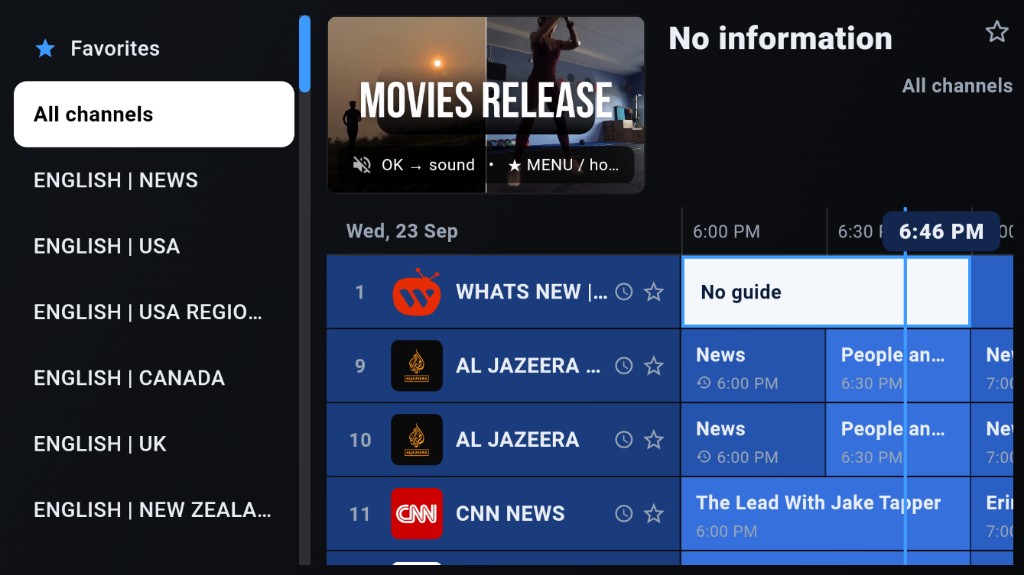
Full 7-day TV guide

What’s on now and next, a week ahead — the grid layout people know from a cable box, with the channel playing in a preview window as you browse.

Catch-up, up to 7 days

Missed the match or the news? Open the programme in the guide and play from the start.

Instant channel switching

Channels change in about half a second, and the preview switches without going black.

Sports with live scores

Games by sport, league and day with live scores — NHL, AHL, OHL, MLB, NFL, NBA, Premier League, F1, UFC and more — plus the channels carrying each one.

Movies and series

Posters, descriptions, seasons and episodes — 4K and 5.1 titles included — and it remembers where you stopped.

Record and pause live TV

Record a programme to the device while it airs, and pause or rewind live TV.

Favourites and groups

Keep the channels you watch at the top, and hide groups you never open.

Parental lock

A PIN keeps adult categories closed — keypad built for a remote, not a phone.

Also included
  • Search everything — one search across live channels, movies and series
  • Audio tracks & subtitles — clear track names, closed captions where carried
  • Reminders & schedule — upcoming programmes in one list
  • Radio stations — hundreds, remote-friendly and searchable
  • Portal Manager — server, connection status, and device ID for support
  • Picture & sound controls — lip-sync, video engine, catch-up per device
  • Updates & messages in the app — no hunting for download links
  • No ads in the app — the app itself never shows advertising

Devices

Works on the screen you already own.

Amazon Fire TV

Stick, Stick 4K, 4K Max and Cube

Android TV & Google TV

Boxes and built-in smart TVs

Android phones & tablets

Android 7.0 or newer

iPhone & iPad

Via Smarters Player Lite or CAST4k

Any TV with HDMI

Add a Fire TV Stick and it becomes smart

Apple TV, or a Samsung or LG smart TV with its own system? Sign in with your Xtream username and password in an IPTV player such as Smarters Player Lite, IBO Player or IM Player. The Castor app itself is for Fire TV and Android.

Setup

On your TV in minutes.

Install the app, message us on WhatsApp, and we send your trial. Support is primarily on WhatsApp — a person answers.

Install Castor

  1. Fire TV / Android TV — Install Downloader by AFTVnews from the Amazon Appstore. Open it and type the short code below (fewer characters on the remote).
  2. Android phone — Tap Download APK and install.
www.castor.now/a Download APK

Xtream — username & password

  1. Message us on WhatsApp for a username and password (24-hour trial).
  2. Open Castor and choose VIP Xstream Code Servers on the first screen, then your server.
  3. Sign in. Your channels and TV guide load straight away.

MAC — device ID

  1. Open Castor and choose VIP Servers, then your server. The screen shows your device ID (MAC).
  2. Send that MAC to us on WhatsApp. We activate your line (48-hour trial).
  3. Type the profile name we give you, press Activate, and the guide fills.

Other IPTV players

Your Xtream login works in most Xtream players — not only Castor. On iPhone, iPad or Apple TV, Smarters Player Lite is free on the App Store.

  1. Install the player you prefer.
  2. Message us and tell us which player you use.
  3. Choose Xtream Codes login and enter the details we send.

TiviMate (MAC / Stalker)

Same channels, guide and prices. Start with the same 48-hour free trial.

  1. Message us on WhatsApp — tell us you use TiviMate.
  2. Add a Stalker portal playlist and send us the MAC TiviMate shows.
  3. We activate it — usually within a few minutes.

Channels

Six regions, sorted so you can find them.

Grouped by region and by what you’re in the mood for — not one endless scroll of thousands of rows.

America

United States, Canada, Mexico and Latin America

  • National networks
  • Local & regional
  • News & sports
  • Movies, series, kids
  • Spanish & French Canadian

Europe

UK, Ireland, France, Germany, Italy, Spain, Portugal, Poland, Balkans and more

  • National broadcasters
  • News & sport
  • Movies & entertainment
  • Kids, documentary, music

Asia

India, Pakistan, Bangladesh, the Philippines, Turkey and the Far East

  • National & regional languages
  • News, sport, drama
  • Movies, kids, music

Arabic

Gulf, Levant and North Africa

  • National channels
  • News, sport, series
  • Kids, music, religious

Africa

West, East and Southern Africa

  • National channels
  • News & sport
  • Movies & entertainment

Australia & NZ

Free-to-air and subscription channels

  • National networks
  • News, sport, movies
  • Kids & documentary

Sport is sorted by the game — baseball, ice hockey, American football, basketball, soccer, motorsport, fighting — then by league, with live scores and the channels for each fixture. Line-ups depend on your activation and can change. Message us on WhatsApp to confirm channels before you pay, or start a trial and look through the list yourself.

Why switch

Less cost. More control.

Castor Typical cable / satellite
Monthly cost From $8.33 a month Often $60–$120
Contract None. Nothing renews by itself 12 or 24 months
Equipment Your Fire TV Stick, box or phone Rented box per TV
Installation About 5 minutes, yourself Engineer visit
7-day guide & catch-up Included Usually extra
Try before paying 24 h / 48 h free, no card Rarely

Prices compared against typical North American cable packages; your provider may differ.

Pricing

One price. Everything included.

Every plan has the same channels, films, series, guide and catch-up. Longer plans simply cost less per month. Same plans for Xtream and MAC activation.

Free trial needs no card. Nothing renews automatically — we keep no card on file. Arrange payment with us on WhatsApp (PayPal or cryptocurrency).

Reseller panel

Run your own customers on our system: create lines, renew them and see who is connected. No servers to rent, and no app to build. Wholesale credits never expire — you set your own retail price.

Ask about reselling

Pay & support

Simple to pay for. Easy to reach us.

How you pay

  • PayPal — balance or card at PayPal’s checkout
  • Cryptocurrency — sent straight to us if you prefer
  • No card stored in the app
  • No auto-renewal — nothing charged by itself

How you reach us

Trial requests, plans, setup help, or a channel that isn’t working — message WhatsApp primarily. We answer within a few minutes during the day.

FAQ

Everything you might be wondering.

If yours isn’t here, message us on WhatsApp and a person will answer.

Xtream or MAC — which should I pick?

Both give you the same channels, guide and prices. Pick Xtream if you want a username and password you can also use in other players or on an iPhone. Pick MAC if the box stays in one place and you never want to type a login — the app shows a device ID, we activate it, and you are in.

What is IPTV?

IPTV means watching television over your internet connection instead of a cable or satellite line. You install an app on a device you already own and the channels arrive over the internet.

Do I need a smart TV?

No. A Fire TV Stick plugs into any TV with an HDMI port and turns it into a smart TV. Castor also runs on Android TV boxes and on Android phones and tablets.

Which devices are supported?

The Castor app runs on Amazon Fire TV (Stick, Stick 4K, 4K Max and Cube), Android TV and Google TV, and Android phones and tablets on Android 7.0 or newer. On iPhone, iPad, Apple TV or a Samsung or LG smart TV, sign in with your Xtream username and password in an IPTV player such as Smarters Player Lite, IBO Player or IM Player.

Can I use another IPTV app?

Yes. The Xtream login we send you also works in Smarters Player, IBO Player, IM Player and most other players that accept an Xtream Codes login.

Can I use TiviMate?

Yes. Add Castor in TiviMate as a Stalker portal playlist, send us the MAC address TiviMate shows, and we activate it. TiviMate users get the same free trial. Each subscription is linked to one MAC address, so a line used in the Castor app cannot be moved to TiviMate later.

How does the free trial work?

Xtream: Message us on WhatsApp and we send a username and password with 24 hours of full access. Open Castor, choose VIP Xstream Code Servers and sign in. No card, nothing to cancel.

MAC: Install the app, choose VIP Servers, send us the device ID it shows, and we switch on 48 hours of full access. No card, nothing to cancel.

How long does activation take?

Usually a few minutes after you message us, and quicker still for returning customers.

How do I pay?

Directly with us over WhatsApp: PayPal or cryptocurrency. There is no payment inside the app, so your card details never touch it.

Does it renew automatically?

No. We hold no card, so nothing is charged automatically. We message you when your plan is close to running out.

Can I watch on more than one TV?

Each device is activated separately, and one subscription streams to one device at a time. Ask us about a second line if you want two TVs at once.

I replaced my Fire TV Stick — do I lose my subscription?

No. On the MAC activation screen, choose Enter your existing device ID and type the device ID from your old stick. Your subscription follows it to the new device. Updating the app never clears your favourites or sign-in either.

What internet speed do I need?

About 15 Mbps for HD and 25 Mbps for 4K. A wired connection or 5 GHz Wi-Fi gives the steadiest picture for live sport.

Can I watch live sport?

Yes. The Sports screen lists games by day with live scores for baseball, ice hockey, American football, basketball, soccer, motorsport and fighting — NHL, AHL, OHL, WHL, QMJHL, MLB and the minor leagues, NFL, NBA, MLS, Premier League, La Liga, Champions League, Formula 1, NASCAR, UFC and more — and shows which channels carry each game.

Are French and Canadian channels included?

The channel list is grouped by country and language and includes Canadian and French groups. Ask us for the current list before you pay.

What do I do if a channel is not working?

Message us on WhatsApp with the channel name. Most problems are fixed the same day, and we tell you honestly if a channel is gone for good.

Can I sell Castor to my own customers?

Yes. We run a reseller panel where you buy credits at wholesale, set your own retail price and keep your customers. See the reseller section above, or message us on WhatsApp.

How do I get help?

Message us on WhatsApp at +1 903 502 0548. We answer within a few minutes during the day. You can also visit www.castor.now.

Is IPTV legal where I live?

The rules differ from country to country and they are your responsibility. Please check what applies where you live before you subscribe.

Ready to see it on your own TV?

Start with 24 hours (Xtream) or 48 hours (MAC) on us. If it isn’t for you, nothing happens — there is nothing to cancel.

WhatsApp